Personalized Learning Paths

I have been working on a project for quite a while to better personalize learning for our students in numeracy.  My teaching partner and I began one for literacy as well, but have a lot of work to do (I’ll blog about that when we are closer).  We are using the same idea for our other standards through the lens of our inquiry units, so those will also be rolling out as we complete them.

Our first grade students are 1:1 with Chromebooks in our classroom and we have spent countless hours and days and months now trying to decide how to best use these tools to boost student engagement and learning experiences(see the upcoming post about student scheduling to learn more about this).  We departmentalize for small group and teach all of the math lessons and two of our reading groups, while my co-teacher teaches most of our reading groups.

We have an amazing classroom space, 1:1 technology, and a great collaborative relationship between my co-teacher and I. However, we do face other hurtles such as limited storage space and trying to balance the usage of tech vs. hands on tasks.

We knew we wanted a way for students to track their learning that would allow for them to move freely from one standard to the next unencumbered by the learning paths of other students.  However, finding a mode of delivery that would allow for this has proven to be quite challenging.  In the end, you will see that we had to do some site-smashing to best meet our goal (and we hope it works).

What We Needed

  • Students to be able to track their standards met
  • Students to be able to access modules and activities for standards currently being practiced quickly and easily
  • Ability to link to websites for practice
  • Ability to provide modules that would not allow students to “fall down a rabbit hole” after completion
  • Ability for students to upload multiple types of assignements such as pictures of hands-on activity completed and assessment videos

What We’ve Tried and Why They Don’t Work Alone

Our district uses Canvas as our LMS and we love it for many of it’s features, most notably what we believe it was created for, a way to organize learning.  However, there are many other apps and sites that better meet the needs of emerging and non-readers and writers that are more user friendly for modules, online student assignments, direct instruction videos, interactive games and quizzes.

For modules, we used Canvas but were having trouble with the microphone. We talked to our Blended Learning Specialist and looked deeply at Canvas modules, but there are problems with the microphone that weren’t easily resolved and it was much more work for students to submit items than we thought reasonable.  We didn’t want them spending their learning time on accessing and uploading their assignments, we wanted them spending their time on constructing new knowledge.

We used Nearpod for whole-group modules, but we didn’t see a way for it to be used for students to work at their own pace.

We began by embedding our activities in Blendspace because of it’s icon-centric design, but found that it was too distracting for students when navigating because of the option to move to other activities on the pages they were accessing.  We also had a problem with some videos continuing to play while others started.  We had the same problem with YouTube videos because when the video stopped, they had the option to click on other videos and fall down the rabbit hole of “other videos you might like.”

We loved Vimeo for uploading flipped videos because it is a secure stand-alone program that allowed us to upload only that particular video.  However, Vimeo, like many other programs, costs money and we were soon reaching our storage limit.  We loved Screencast-omatic for recording flipped videos that captured onscreen material but then had to upload them to YouTube which led us back to the YouTube problem. We recently learned that it also offers storage for flipping videos of the same sort and it looks like it offers much more storage without distractions at the end.

We loved Seesaw as our online learning journal, but there is was no way to link it to our Canvas pages for content areas without them having to navigate the feed.

We loved Google Classroom for assignments and the quick add feature in the extension for classroom for sites.  We also loved the option in assignments to create a student copy automatically (and save to their drive), but assignments cannot be made for individual students or student groups.

However, our problem remained.  We needed a quick and easy way for students to navigate directly to their standard of practice and have quick access to the activities, but also have a way to track their progress and move along a continuum.

The Plan

standard-1We revisited Nearpod as they have recently added a student-paced lesson component that allows students to work through modules on their own.  We decided the options in Nearpod to add videos, activities, upload files and allow students to write on them and the different options for quizzes at the end would be the best fit for our learning modules at this age.

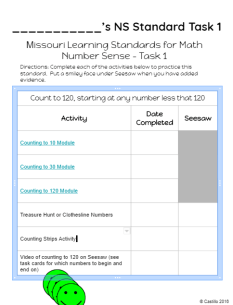
We decided probably the best thing we had seen to create these tracking sheets for the standards was to use Google Slides and share it with students through Google Classroom.  That way they could start at the task they needed to practice and work their way through.  We linked the Nearpod modules to the Google Slides as well as the other activities they needed to create and each one ended with an assessment of the standard such as uploading a video to Seesaw of them counting from 1-120 starting at different numbers.task-1
Our next issue was that while Seesaw is awesome, it only stays loaded on iPads and each student has to re-scan the code every 15 minutes on their Chromebook to add items from it.  Since most of our iPads are in use for OSMO in our classroom, we needed a way for students to have easy access to their stories so we printed a class QR code for each student’s clipboard and used shipping tape to tape them to the back.  Students always have their clipboards with them because they use them for their daily schedules and Lexia/Dreambox goal tracking.

We are still working through how to best store the hands-on activities for easy access for students, but think we may have some ideas on that as well.

Above are examples of a Domain tracking sheet and a task sheet for an individual standard.  The idea is for students to move the green smiley face over when the task is completed.  We will then meet check the Seesaw feed and meet with them to fill in the date met or provide additional instruction if it is not met.

We will begin using this tracking system first for numeracy in the next few weeks, so look for my reflection coming soon!  We are excited to see how it plays out in the classroom!

As always, please provide comments and feedback as this is a continual process for us and we need all the input we can get!


Adaptive Software Lessons

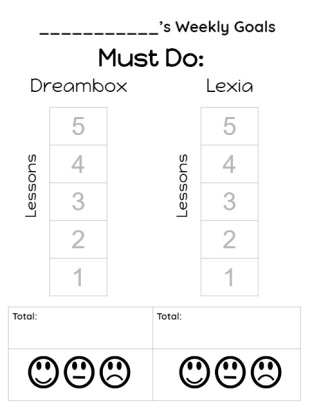
Our district adopted Lexia and Dreambox for our adaptive learning software for literacy and numeracy.  We noticed quite quickly after the start of the year that many of our students were putting in the “minutes” on their adaptive learning software, but they weren’t actually completing many lessons.  We talked to our district math coordinator and he said students should be completing 5 or more lessons each week in each program.

We sat with students and looked at their progress, had conversations about when to ask for help, started a parking lot where they could write their names when they needed help, discussed a peer help system for asking another student for help and tried motivators such as leader boards, etc.  Nothing was working.

We decided to try a new idea.  We created this goal tracking sheet for students to track goal-sheetstheir goals each week on a daily basis.  When they completed a lesson, they colored in a spot on their grid (this also helps with their math standard for bar graphs).  We told them that they would receive a Classroom Dojo point for getting all 5 lessons in Dreambox and another for completing all 5 in Lexia.  The kicker was that every lesson above and beyond 5 got them a Dojo point for each lesson!

In our classroom, we use Dojo as our reward system and do it a little differently than most.  We don’t believe in extrinsic rewards that lead to “junk” such as candy and toys; we want our students to be intrinsically motivated.  However, we also believe that students should have the opportunity to earn rewards for a job well done.  So we allow students to accumulate their points.   They can turn in 25 points for tickets such as “Lunch with the teacher,” “Bring a furry friend,” “Preferred seating (this is a bean bag),” etc.  The students can also save for backpacks or lunch boxes as we had many donated from an area business.  My co-teacher and I decided early on that we would give out Dojo points liberally if students were doing things that promoted growth socially or academically so we were both okay with giving these extra points each week as a motivator.

The results the first week were great!  Students brought their computers to us to check to see if their lessons matched ours and gave themselves Dojo points.  The ones who did not meet their goals, had a clear goal during make-up time so they could move on to STEAM stations.  This week was a short week back and we did not pass out our goal sheets.  We had several students ask when we would be getting our Lexia and Dreambox goal sheets.  We are excited to see this process and determine if it continues to be motivational for our students!

3 Act: Christmas Treats – Division 2.0

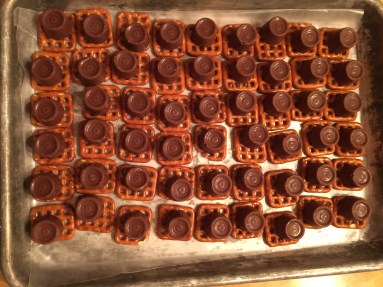
This task can be used two different ways.  It is designed to show the reciprocity between multiplication and division.  This post will lay it out as a division problem. The standard that this best addresses is 3.OA.A.2.  The previous post laid out a similar multiplication problem with a single digit divisor and dividend.

Act 1: 

IMG_9256.JPG

What did you notice?  What do you wonder?

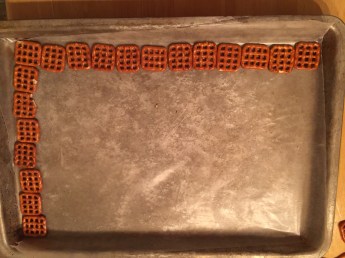
How many columns of 8 will fit on the pan?

Give a too low estimate and a too high estimate.

Act 2:

Act 1 Division.png

What do you know?  What do you need to know?

Act 3:

IMG_9259.JPG

Extension:

I am packaging these in packages of 8 for gifts.  How many packages will I need?

3 Act: Christmas Treats – Multiplication

This task can be used two different ways.  It is designed to show the reciprocity between multiplication and division.  This post will lay it out as a multiplication problem. The standard that this best addresses is 3.OA.A.3.  The next post will lay out a similar division problem.  I have also included an additional image to extend the task using a 2-digit divisor (this is the context used for the division situation in the next post so don’t use it if you also want to use the next post in a division context).

Act 1: 

What did you notice?  What do you wonder?

How many treats can be made on the pan?

Give a too low estimate and a too high estimate.

Act 2:

Act 2- Christmas Treats.png

What do you know?  What do you need to know?

6 rows of 9 treats

Act 3:

IMG_9260.JPGAct 3 Total.png

Extension:

How many can be made using two pans?

Or try this one:

IMG_9258.JPG

Act 3 Total.png

3 Act: Melt My Heart

While recycling crayons for Christmas presents for our first graders, it occurred to me that this would be an excellent 3 Act Math task.  I decided to go about this one a little differently and used the video as the Act 2 and a picture for Act 3.  This activity provides an opportunity for many extensions!  Feel free to comment (as always) and let me know how it can be improved!

Although there are many standards that this task addresses, I feel it is a great extension to 3.OA.A.1.

Act 1:

What do you notice? What do you wonder?

How many crayons will it take to make 6 melted hearts?

Act 2: 

What do you know?  What do you need to know to solve your question?

11 crayons per heart, 6 hearts altogether.

Act 3: 

act-3-melt-my-heart

Extension:

What if I had 28 students in my class?  How many crayons would I need to make one heart per person?

What if the crayons were worn down to half of their full size?


What Does Equal Mean?

IMG_8076.JPGSo often we provide students with mathematics instruction that “makes sense” to us and we wonder why they don’t develop understanding.  Often this is due to the fact that they have not been given an opportunity to MAKE sense of what we are teaching them; to discover it on their own.
An example of this is teaching an addition algorithm that asks students to complete a number sentence that uses two addends and a sum.  We tell students that “equal” means that they are the same on both sides.  Imagine yourself as a 6-year-old, you look at the equation 5 + 3 = 8.  There is nothing the same on both sides of the equal sign.  On the left side, there is a 5 and 3 and the right has an 8.  We must stop assuming that students make sense of their world in the way that we do now that we have had countless experiences that have shaped our perceptions;  We forget that we have access to a much larger schema.  We must allow them to “make sense” and not assume that what we teach “makes sense.” IMG_8075.JPG

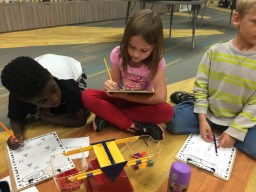
One of the best sense-making tools for students to use to discover the meaning of the equal sign is to use a pan balance.  Put a post-it in the middle of the balance that has the equal sign on it and let students explore different number combinations that will balance the scale.

After they have time to discover and play (yes play is an essential learning opportunity), ask questions like, “if I have 5 cubes in this side, and I have 3 in the other, how many cubes will I need to add to make the sides balance (or make the cubes equal)?”

Here is an example of the pan-balance-sheets I made for students to record their thinking.  We start out with the mat, and place cubes on the mat to model the problem, then we use the recording sheet to write numbers that correspond to the problem we modeled.  Following this lesson, we can introduce the formal number sentence that students should know in first grade, but only after they have been allowed time to make sense of why the equation is set up that way.  This allows students to experience the task in a concrete, visual and abstract way.  Weighted numbers are a great way to connect this as well!

The other great thing about connecting the concept in this way is that missing addend problems are already embedded in the sense making and students see addition as interconnected.  The same goes for equations that are written with the sum first and the addends on the right side of the equation.

When we begin talking about subtraction, we again take out the pan balance and play with numbers.  This is a great way to connect the operations of addition and subtraction and show the reciprocity between the two.

AVMR Topic Modules with Blendspace

I have been trying to find the perfect way to create self-paced content that my students can access based on their Math Add+Vantage Screener data.  I wanted a way to fill in some gaps in their math knowledge that would help them be successful in tasks that require these as prerequisites.  After reading about and listening to experts speak on current brain research about how students reason and make sense of mathematics, I knew that I needed to change my math instruction and provide more connected tasks in heterogeneous groups of students.  However, I knew I wanted to provide additional support during independent work on some of these fundamental tasks as personalized learning goals.

We use Canvas as our LMS in our district, and it is great for many things.  However in first grade, many of the assignments and quiz features are too difficult for early and non-readers to upload their work.  They can upload videos to Canvas, but there are issues with the mic in Canvas and after talking to my Blended Learning Specialist, I decided that I wanted to find a more accessible option for my first graders.

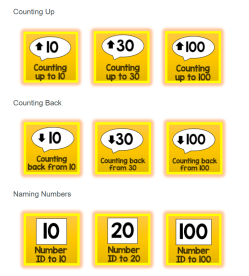
What I have decided,counting up to 10.png for now, is to embed Blendspace content modules into my Canvas Module and link to a quiz after they have accessed the topic page and practiced the skill.  Instead of having them upload their video to Canvas, we will just use our Seesaw recording station to upload a video via iPad to their personal Seesaw portfolio.  That way we can add their assessments to their portfolio.

This is still a little frustrating, as I cannot assign particular students a particular module in Canvanumeracy-goalss, so I have to still have them click on buttons I have made in the course so that they can access the module they need to start with.
I few of the Blendspace modules are ready and as I add more, I will update them on my blog here.  I am having trouble finding online games for several of these, so please feel free to send me a message with any great resources to add to the Blendspace modules.  You are welcome to use them in your own classroom!


I Love Number Talks

IMG_7931 (1).JPGToday one of our students said, “I love number talks” as we were solving the second string of a counting on dot pattern to 10.  It really is crazy.  Our students have the attention spans of gnats, but when they sit down with their whiteboards for a number talk, they are completely enamored with solving and defending their problems and answers.  When I ask for defenses, hands shoot up all over the classroom…and not just my high achieving math students.  My struggling learners are some of the first hands to go up!
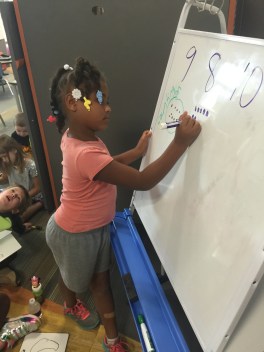
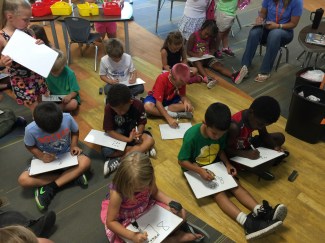
We actually had to change the routine to include student whiteboards so that each of them would feel heard (and we could quickly scan answers). We have 40 students in a combined classroom with two teachers (I teach math and Chelsey teaches reading). 

Our students were really into number talks, but they were easily frustrated if they weren’t called on to give their strategies and solutions, so we tried whiteboards to boost engagement. They use their whiteboards to show their thinking, but still use mental strategies to solve. Right now it is great because they are using dot images and ten frames. 

As we move into bare number tasks, there may need to be some additional discussion about usage of whiteboards. The great thing is that since my students are first graders, they haven’t been taught any algorithms yet (and won’t be by me) so even with whiteboards, the math is still strategy focused. 

In upper grades, I used to use http://www.todaysmeet.com to have students share strategies to boost engagement.

We use the book Number Talks for our question strings and many of the procedures set out in the book.  Our number talks are set up in this way:

  1. Pose an image or task – I pose a question by providing an image or numbeIMG_8152 (1).JPGr task.  Students think quietly and raise one finger for one strategy against their chest, 2 for two strategies, etc.
  2. Think Time – No one talks or raises their hand until I say “hands up for answers.”
  3. Answers Recorded – I write down every answer that is provided at the top of my chart whiteboard.
  4. Defend an Answer – I then ask students “who wants to defend one of these answers.”  It doesn’t have to be their answer, just an answer they can offer a proof or strategy for.  Students then come up to the board and write their solution under the number they are defending.  Sometimes this is in the form of a picture, a dot pattern, or a bare number task.  It can be a combination of any of these.  Prompts I might use are “Tell us about your picture.”  “Can you circle the groups you saw.” “How did you know that 5 and 3 was eight?”
  5. Name the Strategies – We then name the strategies.  Strategies include things like “counting on,” “doubles,” “making a ten,” “doubles minus one,” etc.
  6. Find and Discuss Mistakes – Another important aspect is our focus on mistakes.  When I show the card to reveal the answer after some proofs are offered.  We go back and look at the wrong answers to “grow our brain” by finding the mistakes and where the student might have went wrong.  This is absolutely the most powerful part of our number talk.  And the students who got the wrong answer have huge smiles on their faces when I ask them, “so do you know what you did or how to fix it?”  They eagerly nod their heads and fix their mistake.

Not once during a number talk do I offer words of praise.  I say things like:

  • “Oh, that is interesting, can you tell us more about that?”
  • “___ says it is 9 because he saw a group of four and a group of five.  Is that nine?  How do you know?”
  • “What strategy did ___ use here when he saw that it was one less than five and five more?”

img_8155-1Too often, we think that the best way to teach students to love learning is to shower them with praise.  I would have to say the exact opposite is true.  In order to teach kids to love learning, ask tough questions that make them think and question and defend and examine.  Involve them in every step of the process…and make it accessible.  Number Talks are one of the favorite times in our day.  I have kids yelling at me to “wait, don’t start yet! I just got here and I need to get my whiteboard.  Or I can’t find a marker.  Can you wait to start?”  They are begging me to allow them to engage in the entire math lesson.  What’s more powerful than that?

Rekenreks Rock Our World!

I’ve said it before and I’ll say it again…rekenreks are one of the best tools for building number sense out there and our kiddos are IN LOVE with them!

I introimg_8034duced the math racks to my students 2 weeks ago and they have not lost their luster!

We started with simply exploring the new tools and talking about what we noticed.  It didn’t take long for them to see that there are 10 beads on top and 10 on bottom.  They also quickly saw that there were 5 red and 5 white on each row.

I revisited the term “subitize” with them and reiterated that it means to see a number without counting.  I told them that when we use a math rack, we have a starting position.  On our particular math racks, we use red in the middle and start with the beads on the right.  We slide them to the left to read them since we read from left to right.  We practiced sliding the beads.  I then told them that their challenge was to never use more than one pull per row.  If they needed to count their beads in the beginning, they must count them first and then slide them altogether.  Our goal was to get quicker eac10-rackh time at seeing the numbers without counting.  They stepped up to that challenge immediately!

I like to use the Dreambox Teacher Tool to have students practice subitizing.  They watch the quick image of the math rack and then they make it on their board.  We then talk about what they saw.  It didn’t take long for them to start saying things like, “I knew it was 6 because all the red beads and 1 more white bead were showing” or “I knew it was 9 because only one bead was missing.”

We have since been using them to make ten and next week one of my groups will start the teen numbers IMG_8035.JPGand another will use them to solve addition problems like 8 + 5 by first making a ten.  I love to demonstrate this in conjunction with place value arrows, so stay tuned for some pics and a lesson!

Rekenreks not only build number sense, but they provide a means for rich mathematical conversation, noticing and wondering!

Where to Start Instruction

I have been struggling with where to begin math instruction with my First Graders this year.  I gave them all a number sense screener and have a neat little spreadsheet about what they do and don’t know, but I still couldn’t decide where to start.  I decided my dilemma was due to the fact that I was struggling yet again between my teaching philosophy and teaching my grade-level standards.

This weekend, I picked up my copy of Mathematical Mindsets by Jo Boaler and continued reading.  The chapter on Creating Mathematical Mindsets reinforced my philosophy and encouraged me to go with my gut.  That meant that I would begin and end with structuring numbers and building number sense from the ground up.  What I want my students to know is how to reason with numbers and use them creatively: the relationship between numbers.  I want them to know how numbers are connected, not just to each other and other operations, but to their world.

In our classroom, my partner teacher and I have forty students in one learning lab.  We departmentalize and I teach math, she teaches reading.  We collaborate on every aspect of our day and teach with an inquiry model.  Each day, I do a whole group Number Talk, a grade-level flipped lesson, and an intervention group with each student.  Some days we do a 3 Act Math Task instead of the number talk.  My small group lessons are where I am struggling.  I have always bought into the intervention model and how we need to meet each child “where they are.”  I still believe this to be true, but my opinion has changed a little as to the context of teaching in this way.  I’m not sure that I still think that isolated skills are the answer here.  We always talk about “connecting it back to <insert whatever>,” but should we ever sever that connection in the first place?  Why should we “connect it back” instead of keeping it in context the entire time?  I know the answer is that planning in such a way is hard work.  It is time consuming work.  It is deep cognitive work.  And the truth is, there is not enough time to do it.

I spend between 50-70 hours a week teaching or planning.  It’s funny to hear people say “go home and enjoy your family” but they are also saying, “teach like a champion.”  Well, in my opinion, for most of us, you can’t do both.  At least, not in balance.  I have begun looking at my job as my hobby as well.  I guess that is the upside to choosing a career you are passionate about!